Overview
Client:
Coursera: Google UX/UI Program
My Role:
Led user research and UX strategy, synthesized survey insights, designed and iterated prototypes, created UX deliverables
Timeframe:
February 2025 - Nov 2025
Tools Used:
Figma, Adobe Suite, Microsoft Suite
Image Resources:
Google Nano Banana
Reduced cognitive load and increased user satisfaction in audio guide interactions & validated through usability testing.
The Problem
Museum visitors aren’t opposed to audio guides, they’re opposed to being slowed down, over-informed, or trapped in linear listening experiences causing an experience full of friction. The core opportunity isn’t adding more content, but giving users agency over pacing, depth, and storytelling style, ultimately eliminating that friction.
Museums invite curiosity and movement, but traditional audio guides often stop visitors in their tracks, turning exploration into a waiting game.
Each visitor approaches art with different interests and time constraints, yet audio guides insist on telling the same story, the same way, to everyone.
When audio demands attention instead of supporting it, visitors are pulled away from the artwork and out of the moment entirely.
The Challenge
My Solution
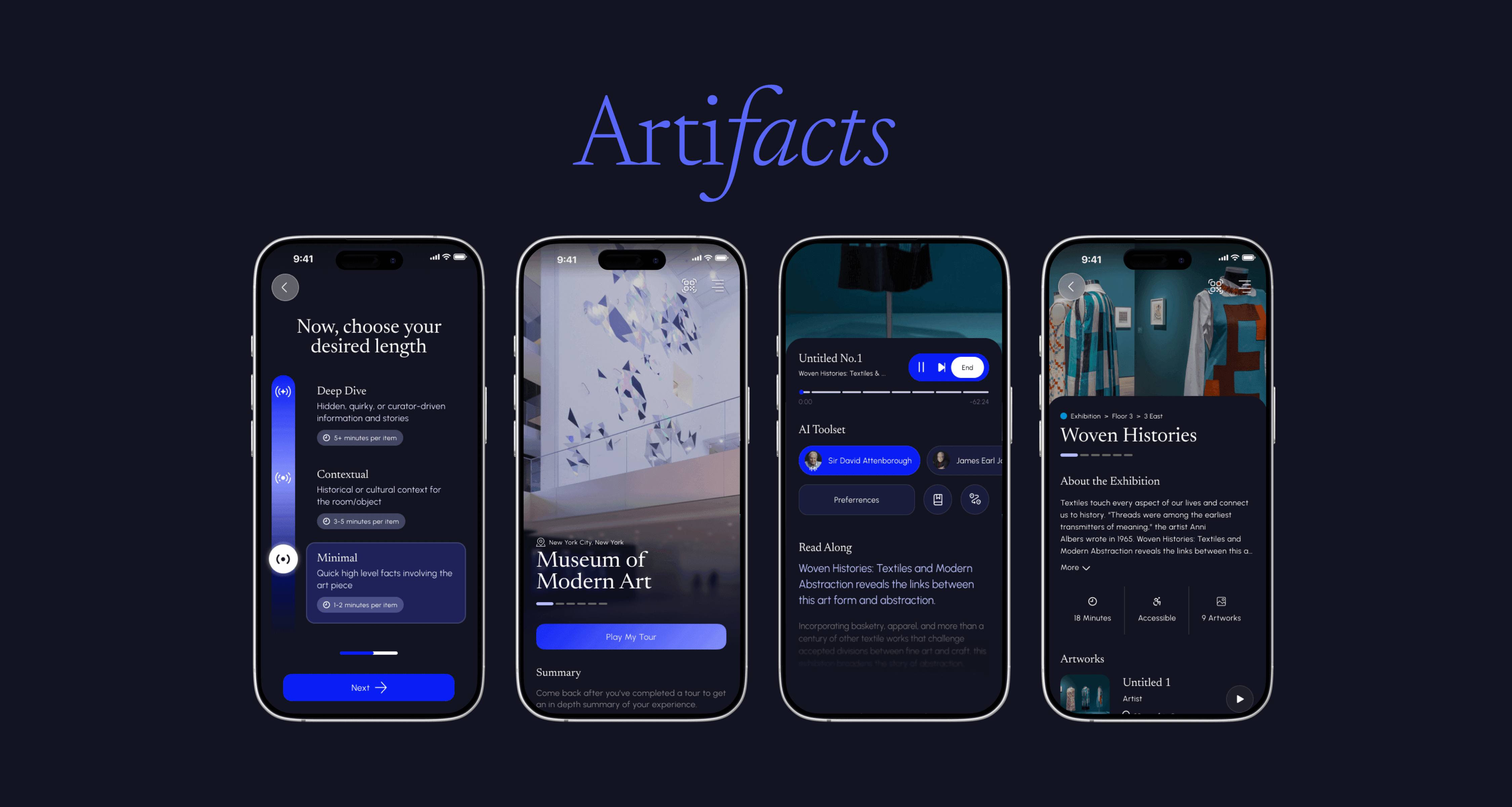
Meet Artifacts
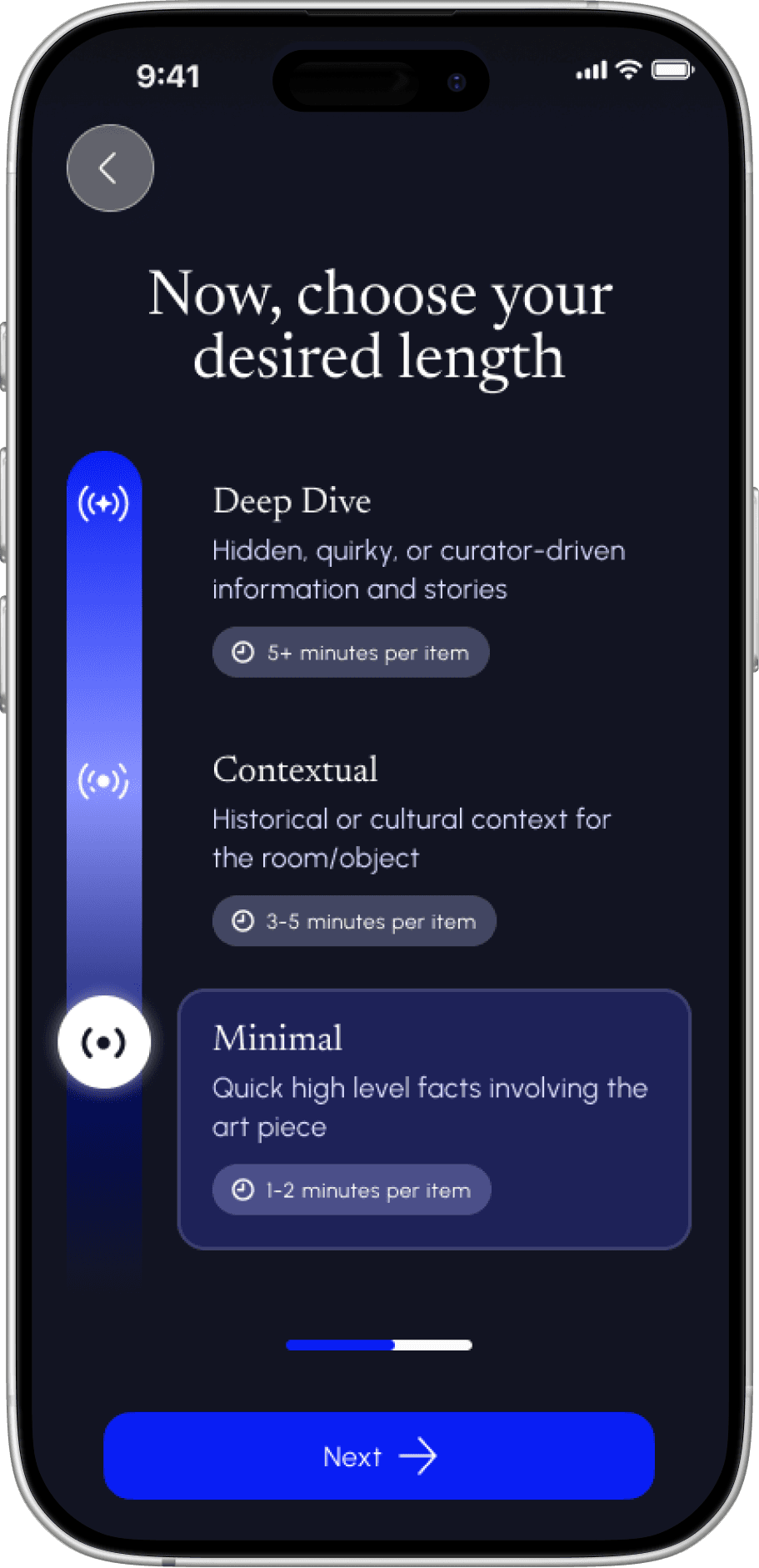
Tailored Depth & Length
While users preferred different levels of detail and duration, these needs clustered into three clear categories. A single onboarding slider lets users choose their ideal experience and instantly see the app adapt.
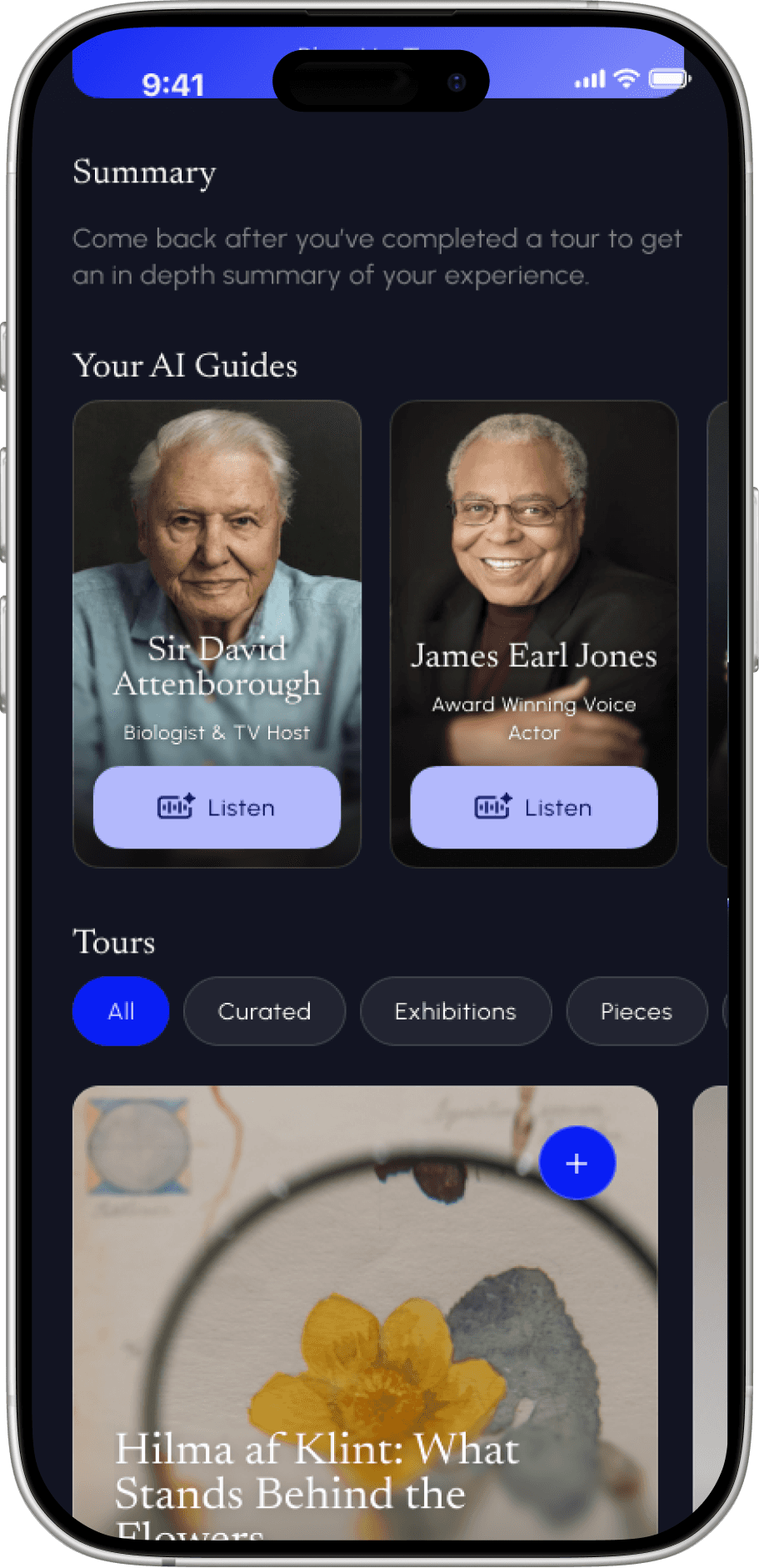
AI Narration
With over 60% of users requesting more engaging narration, Artifacts enables voice selection directly in the listening experience, giving users control over tone and storytelling style.
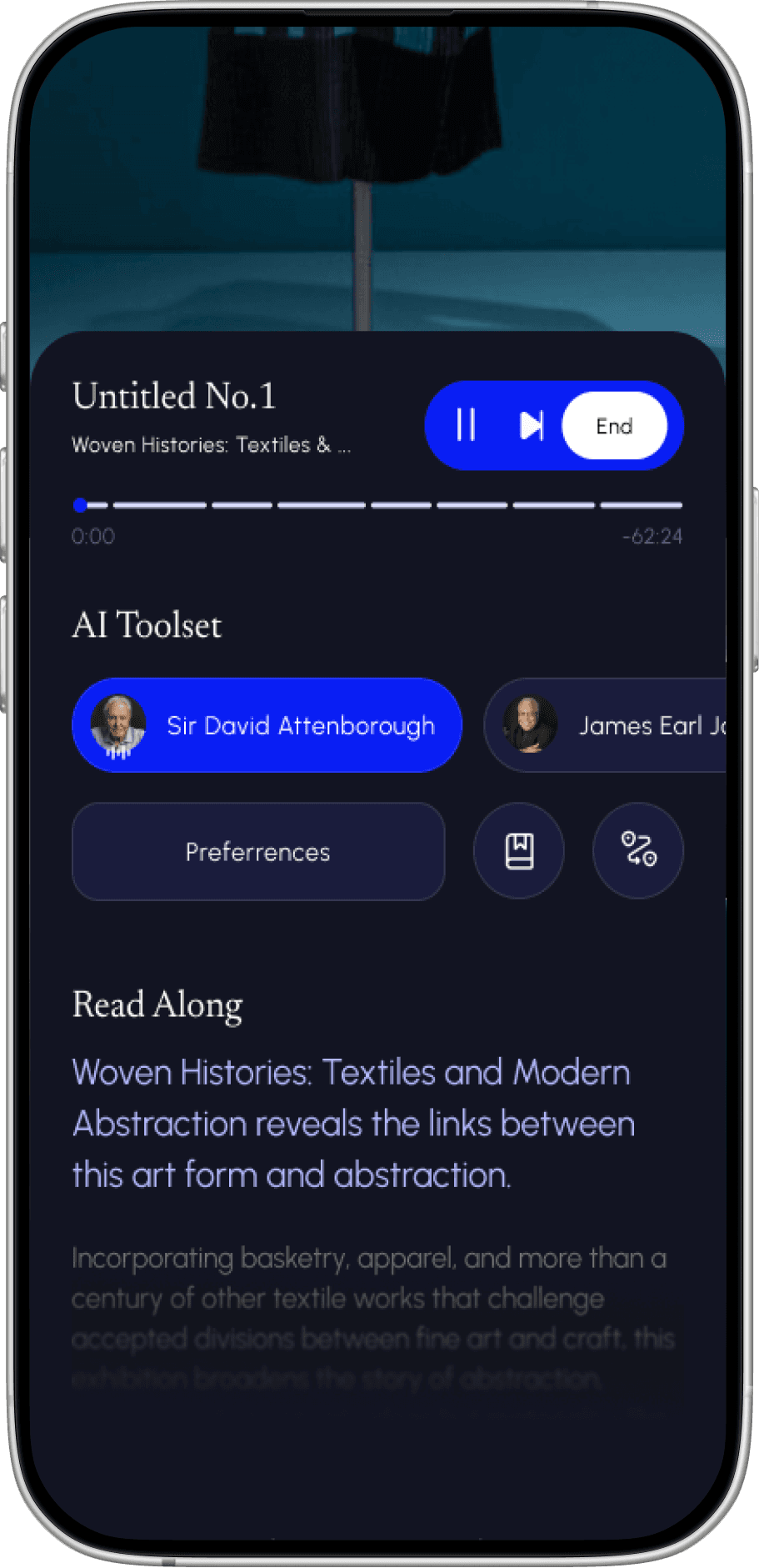
Mini Player Controls & Transcription
Many users prefer to read the descriptions over audio so a read along transcription was necessary as a complementary feature to ensure all who used it could benefit.
Artifacts main mission is to:
Discovery
Survey responses revealed that museum visitors aren’t opposed to audio guides; they’re opposed to being slowed down, over-informed, or trapped in linear listening experiences. The core opportunity isn’t adding more content, but giving users agency over pacing, depth, and storytelling style.
My initial survey revealed that while most users had generally positive experiences with museum audio guides, several consistent pain points emerged:
Museum-goers want more control over how much they learn and how long it takes. Secondary research on audio guide usage patterns reaffirmed these findings, especially around pacing, personalization, and cognitive overload.
Competitive Audit
After comparing the top 5 apps in the audio guide space I learned there was an opening for a more premium and tailored experience. The app that was most impressive in this space was Smartify which targets many flagship museums and offers rich infomation for its users.
Who are the Users?
Users were determined by the following persona and museum data on demographics.
Urban or travel inclined
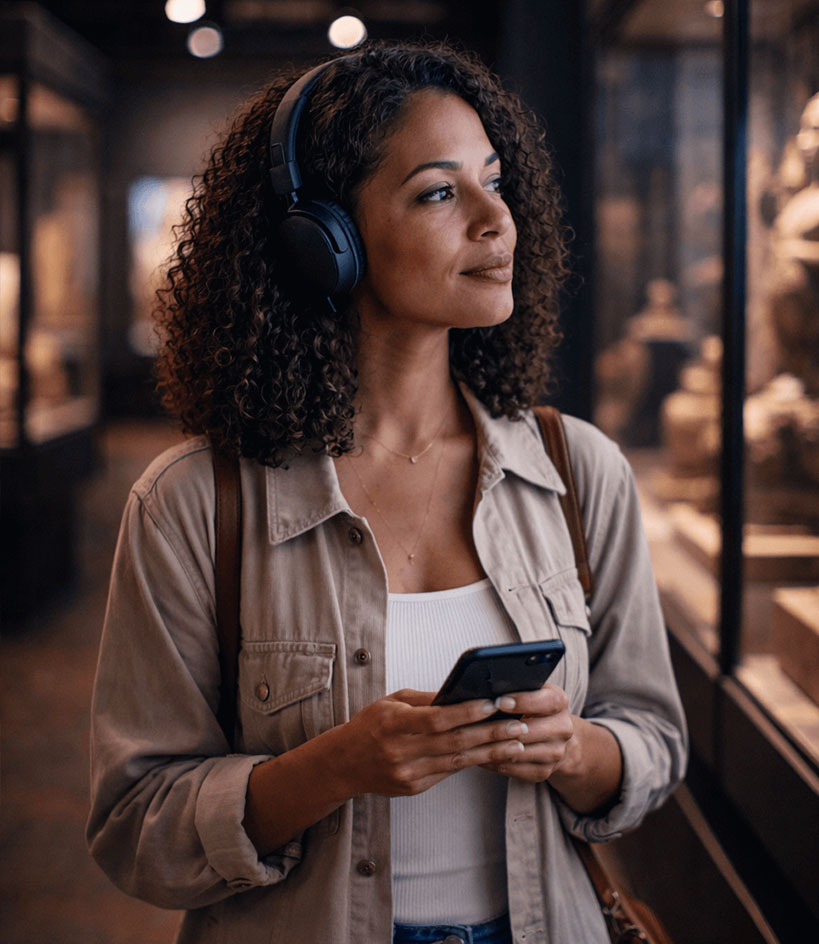
Emma
Age
38
Location
Kansas City, KS
Education
Masters Degree
Occupation
Marketing Executive
Income level
Upper Middle Class
"I've always loved museums but now, with my busy schedule, it's harder to spend the time I want attending them."
Emma is a seasoned museum enthusiast who needs a personalized, richly detailed audio guide experience because she craves engaging yet concise storytelling that fits her busy lifestyle.
Frustrations
Boring & linear experiences
Lack of personalization
Overly academic narration that doesn't suit her interests
Behaviors
Motivations
Interest in art, history, and culture.
Personal time away from kids and family.
Prefers modern tools that integrate seamlessly with her lifestyle.
Goals
Absorb high quality, contextual information without wasting time on filler
Efficiency while exploring
Find a guide that balances education with narrative flow
This user persona informed several key features.
Feature Prioritization
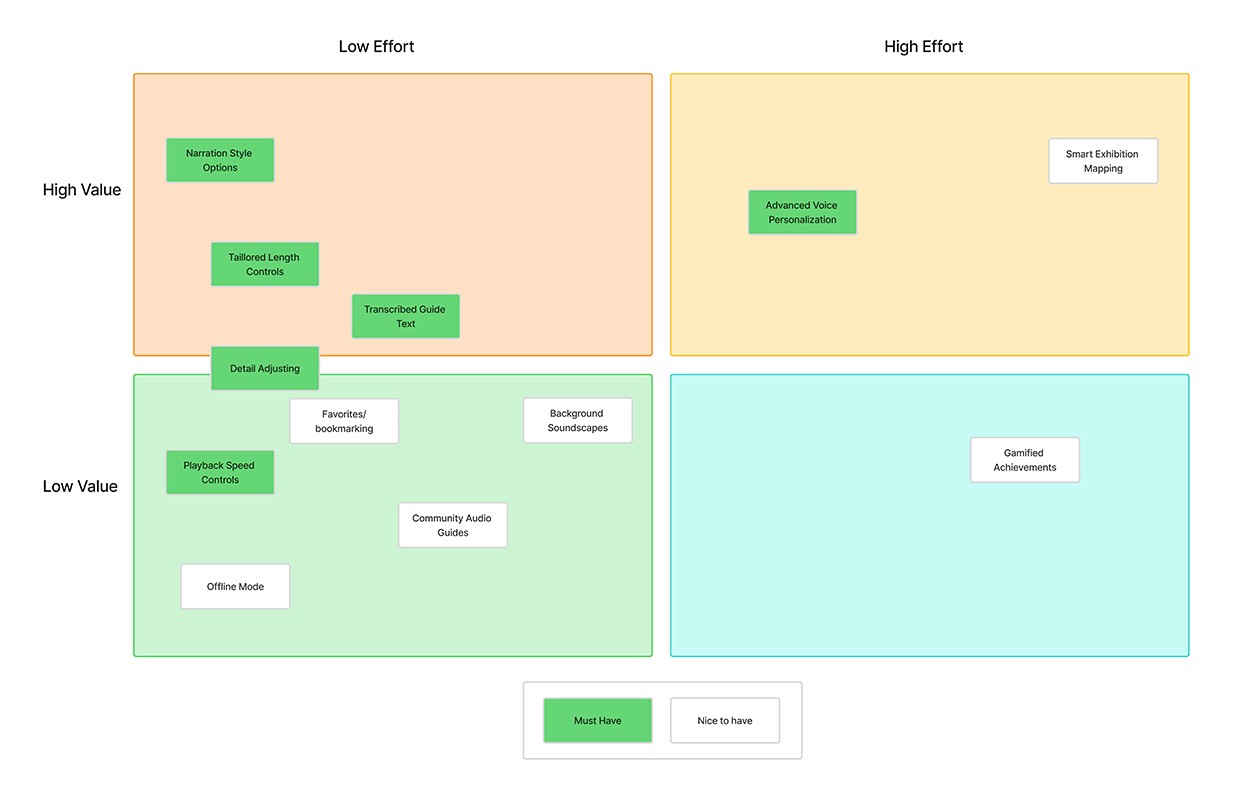
By letting users rank their needs, I mapped everything into a priority matrix. That quickly exposed which solutions were worth building now and which ones should wait for a later release.
This included:
Narration/voice personalization
Tailored Length Controls
Transcribed guide text
Detail adjusting
Playback speed controls
Develop
Low-fi Wireframes & User Flow
Once features were prioritized I sketched some wireframes of the homepage and modeled other pages based on it's language.
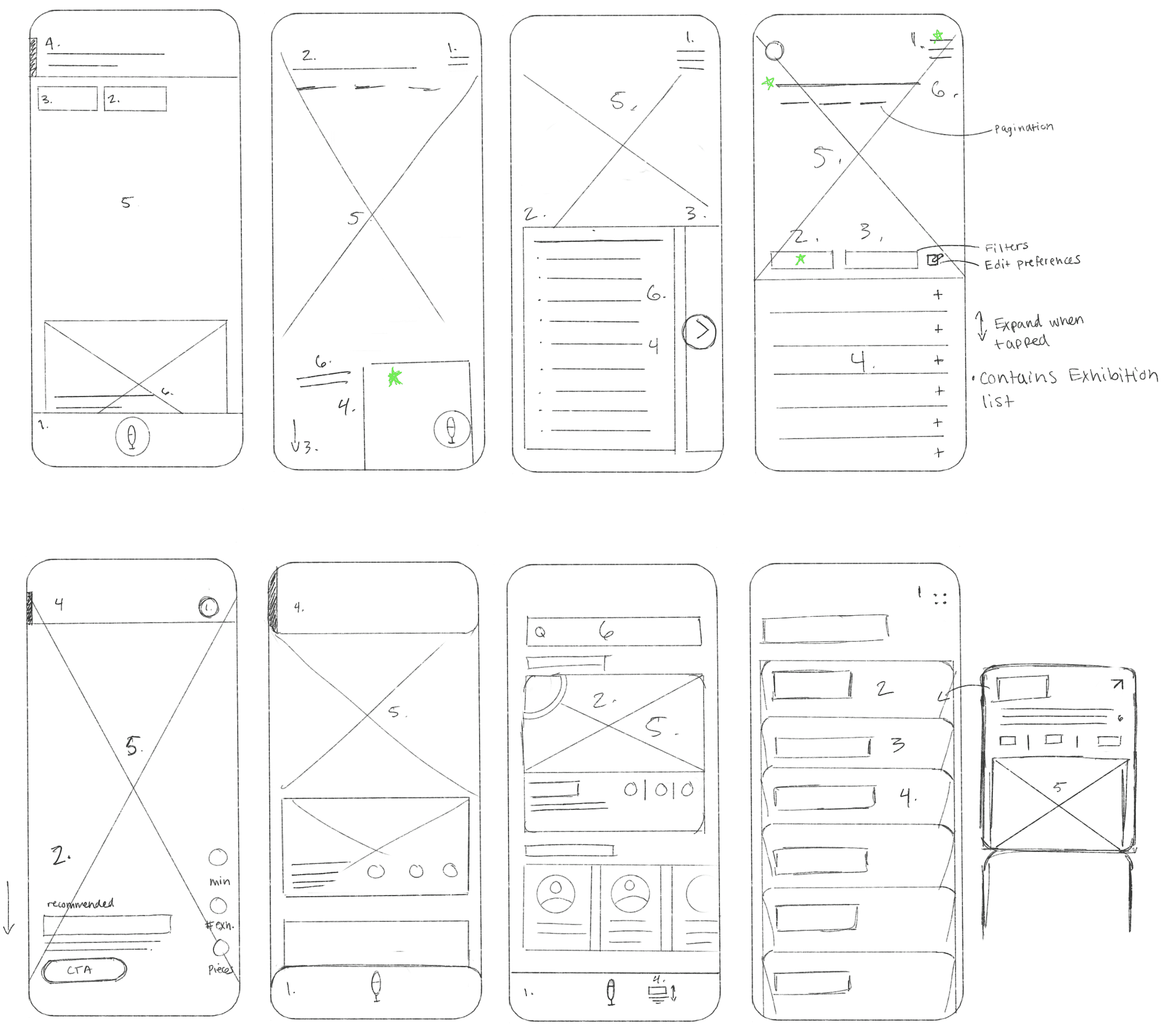
Low-fidelity sketch exploration of homepage
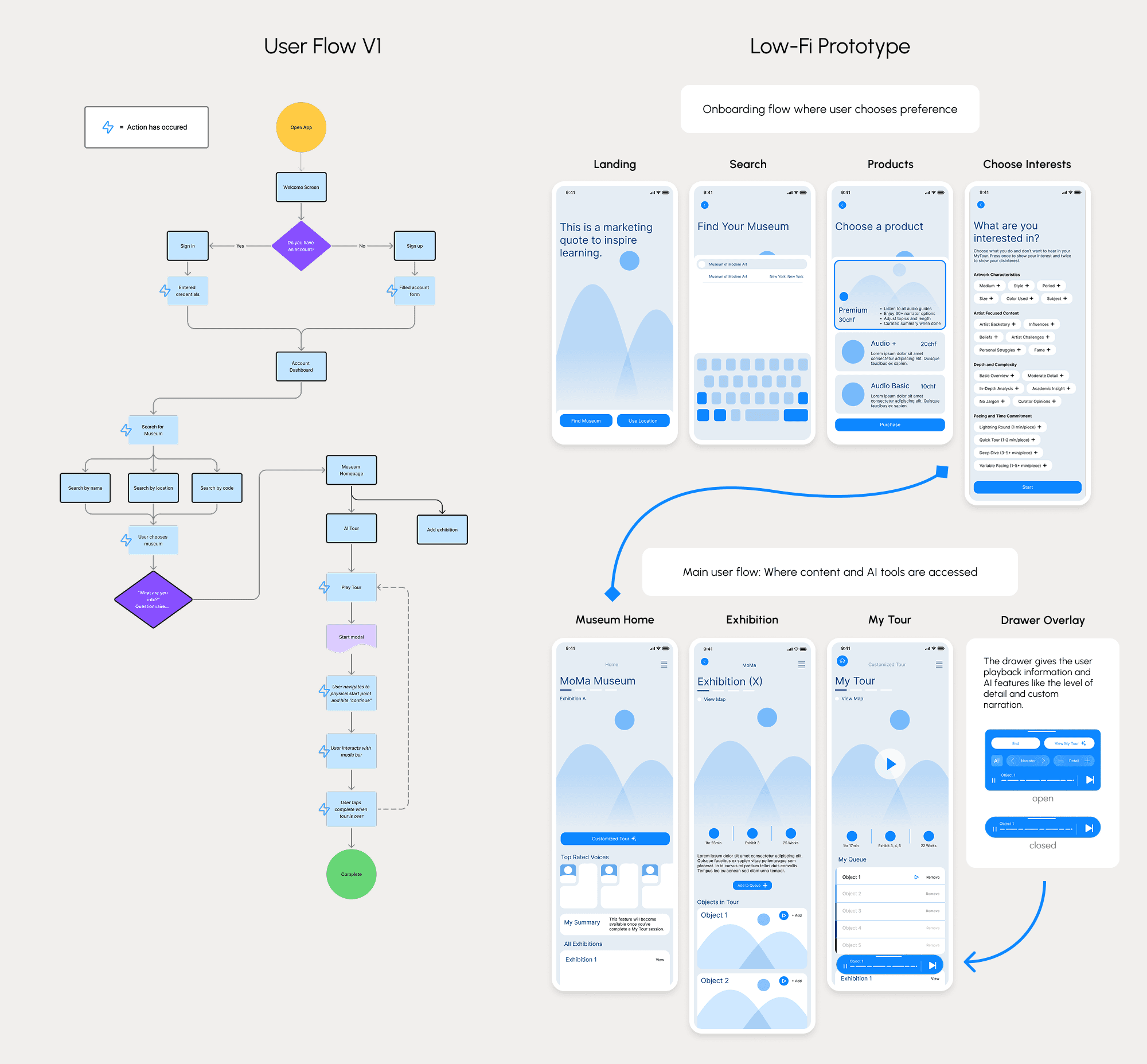
User flow version 1 showing profile creation which didn't work for business or user needs. Shown on the right is the low-fidelity prototype screenshot describing the main pages users will see in the user flow.
A 25% dropoff rate & difficulty accessing features proved iteration was necessary
A mix of unmoderated and moderated usability testing validated the prototype against user and business goals. Unmoderated results surfaced key friction points at scale, while moderated sessions explained the behavior behind them. Three priority themes emerged, driving focused improvements between low- and high-fidelity iterations to reduce rework and save time.
Theme #1: Navigation
Navigating the app was difficult due to repeat page layout and lack of labeling.
Insight
Users need a more intuitive way to orient themselves within the app.
Solution
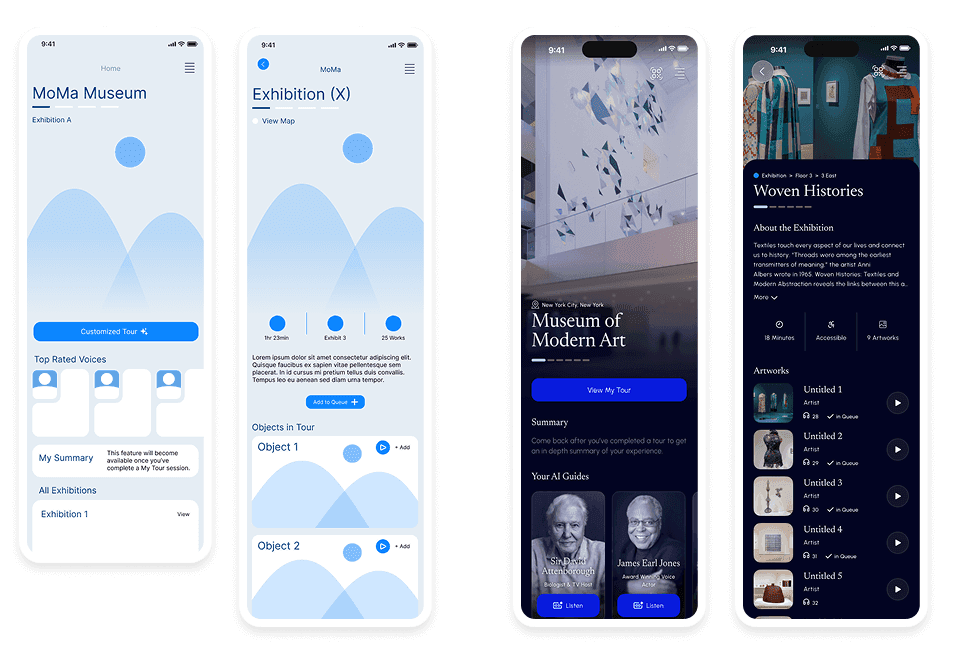
By varying the layout and heirarchy I was able to draw a distinction between pages allowing users to form a mental breadcrumb of their experience.
Theme #2: Playback Controls
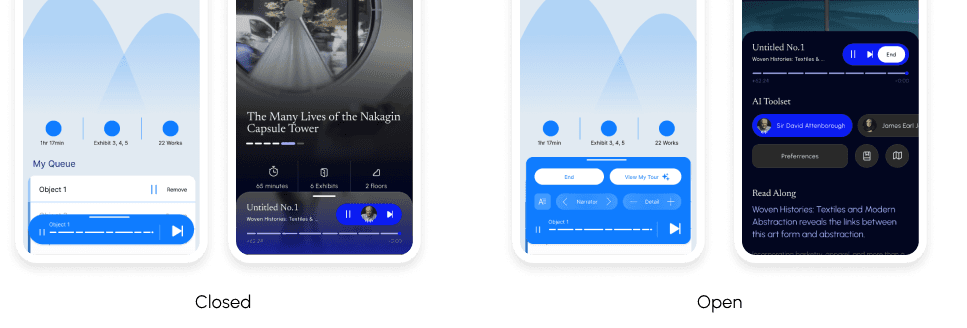
Many users were unaware of the media drawer and what its use case.
Insight
The media drawer should be more noticeable and clearly communicated.
Solution
To make the media drawer more noticeable I scaled it up, added hints of features in the closed state and increased it's contrast. The open state now has more prominent features and a transcription to better align with user needs. I also added a media drawer page to the onboarding to inform the user of this feature early.
Theme #3: Interactive Feedback
Most users weren’t sure if they completed the task due to lack of feedback in the prototype.
Insight
Solution
The main goal here was to communicate success better. I added interactions ensure the user knew they complete the task.
Additional Feedback from a Designer
Version 1
Version 2
Version comparison before and after designer and user feedback. Greatly improved linear user flow with minimal friction to give the user a "first win" as soon as possible.
Solution:
Early account creation added friction before users experienced value. I removed it from onboarding to prioritize activation and reduce drop-off, deferring authentication until after emotional buy-in. This approach protects conversion while allowing future testing to determine the optimal placement based on business and retention metrics.
Informed Response:
While AI audiobook narration has faced resistance due to emotional and performance expectations, museum audio guides are judged on clarity, relevance, and efficiency. AI is well suited here, enabling personalized depth, flexible pacing, and on-demand storytelling. In this context, AI narration enhances usability and exploration rather than attempting to replace human performance.
Iteration Summary
User testing revealed points I was able to iterate on and find the best solution. The main changes were to:
Onboarding: Users can now enjoy choosing their preferences without prolonged interactions.
Navigation: Artifacts doesn't have more than 2 modes so a traditional nav bar was left out for now, so users had a difficult time orienting themselves. A slight variation in page layout proved to benefit the users in app awareness.
Playback Controls: Users needed a more robust playbar that communicated it could be opened. After iteration the playbar is more noticeable and understandable according to our users.
Interactions: The movement between pages and buttons has been expanded and communicates success much better.
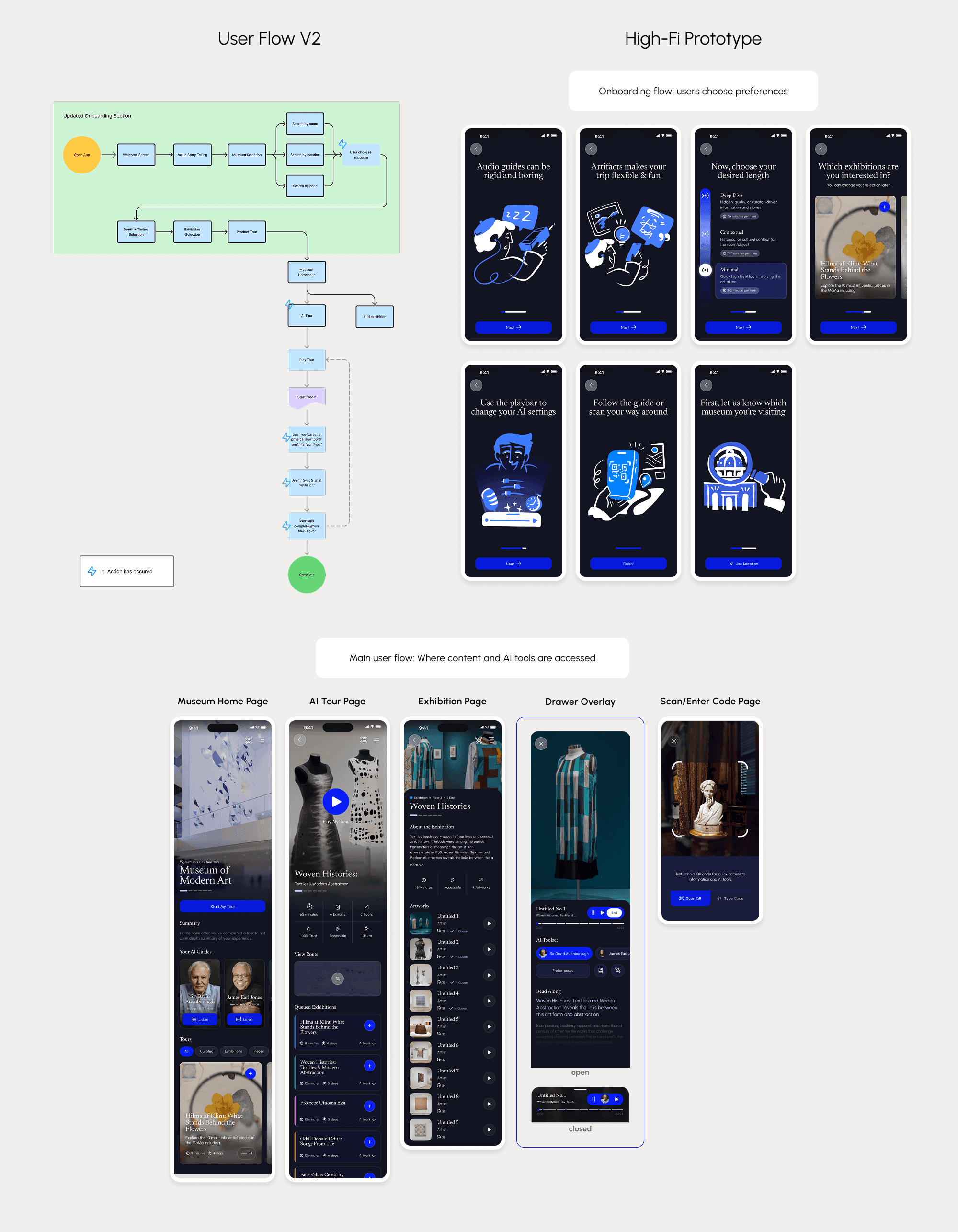
Updated user flow to include an updated onboarding process and more streamlined museum search function.
Delivery
While crafting Artifact I kept user and business goals at the forefront. The result are a proven app prototype that:
Provides users with rich information that appeals to their attention and time
Creates a digital platform for any museum or independent exhibition
Builds customer engagement & gain users trust in a world where AI isn't 100% trustworthy yet
Key Learnings
During the creation of Artifacts it was imperative to know the user deeply and iterate constantly. Even iterating on the surveys proved to show more valuable information. Sharpening my skills with AI was also important as it will have lasting impacts on my work and the world.
In the Future…
Testing was a key component in making sure we met the users needs so my goal will be to continue to test components that users find care most about. Also, taking new critiques from designers will be my goal since that informed many great changes and provoked new design challenges.

Thank you for your time!
Like my work? Let's chat.